
Developer quickstart
Make room for your company.
Technical alpha — for developer evaluation
Create a company, add people and AI agents, and keep their responsibilities and reporting clear. The existing Time Tracker records delivery hours separately. Optional execution remains experimental.
Start with a name and optional purpose, then add only the members you need. VCM is a local workspace for one operator. It stores the context you enter; it does not synchronize arbitrary chats or shared team accounts.
Local setup
Install VCM
Alpha 8 distribution-name maintenance. The commands below install the
0.1.0-alpha.9 archive for local company-management evaluation.
Plain company setup, membership, responsibilities and the Time Tracker need no provider account or runtime connection. Create your company →
Use Node.js 24.14 or later within 24.x, or 26.x with npm:
>=24.14 <25 or >=26 <27. Check the versioned
release, source revision and archive checksum before installing. The release includes
checksums.txt and release-manifest.json.
Terminal · Alpha 8 distribution-name maintenance
npm install --ignore-scripts --prefix ./vcm-preview https://github.com/strobl/virtual-corporation-manager/releases/download/v0.1.0-alpha.9/vcm-0.1.0-alpha.9.tgz
npm exec --offline --prefix ./vcm-preview -- vcm --version
npm exec --offline --prefix ./vcm-preview -- vcm --data-dir ./my-company
Expected version: 0.1.0-alpha.9. The first command downloads the archive;
subsequent commands use the isolated installation. Open the loopback URL printed by
VCM. Use the same working directory and data directory when restarting. Add
--port 4311 if port 4310 is occupied, or --no-open to open
the URL yourself.
The package name remains gitflash. vcm is the canonical
command; gitflash is a compatible alias for the same executable. No npm
package named vcm is required.
Optional configuration example
Try the three-agent example.
Patchwork Studio (example) has one Product department and three peer agents: Builder, Reviewer and Researcher. Their responsibilities describe a fictional release-notes project. No manager is required. The file contains configuration only, with no executed work, jobs or booked hours.
The same file ships with the installation at
vcm-preview/node_modules/gitflash/docs/examples/three-agent-studio.json.
- Open Settings → Import a company definition.
- Choose the JSON file, or paste its complete contents into Definition JSON.
- Choose Review import. Inspect one corporation, one department and three agents with their responsibilities.
- Choose Apply changes, then open Corporations → Patchwork Studio (example).
- Select each agent and inspect its instructions. Importing does not execute them.
Each import creates fresh IDs for companies, departments, agents, assignments and company relationships. Repeating an import adds another corporation with a suffixed short code; it does not update the first. Use the existing corporation's edit controls for changes.
Return to the same local workspace.
VCM saves organization, work and time records in local SQLite. The explicit
--data-dir flag takes precedence over GITFLASH_DATA_DIR,
then the default ~/.gitflash. Existing data is not moved automatically.
Relative paths resolve from your terminal's working directory; use an absolute path if
you start VCM from different directories.
npm exec --offline --prefix ./vcm-preview -- vcm --help
npm exec --offline --prefix ./vcm-preview -- vcm --data-dir ./my-company --no-open
Stop with Ctrl+C before maintenance. The server binds to loopback for one local operator. It has no shared accounts or supported LAN, proxy or tunnel hosting. The local core needs no provider account, hosted database, billing or telemetry.
To remove this isolated installation, stop VCM and run
npm uninstall --prefix ./vcm-preview gitflash. Your workspace directories
remain intact.
Create a company. Add your team.
- Open Corporations → Create company, or Create your company in an empty workspace. Enter a company name; purpose is optional.
- Choose Continue, inspect the readable review, then Create company. Back keeps your draft; cancelling saves nothing. Your new company starts empty.
- Choose Add member. Enter a name and role and select Human or AI agent. Add useful responsibilities; departments and reporting are optional. Choose Review change → Add member.
- Select the member inside the company. Choose Edit member, change a responsibility or manager, and inspect What will change before saving. Restart with the same data directory and reopen the saved company.
Company details, departments and relationships stay in the company workspace. Selecting a department shows its members; editing it is a separate action. Shared members retain one identity, and their review identifies the companies affected. Company membership, reporting and ownership between companies are distinct relationships.
The server validates the complete definition. Unsupported fields, invalid references and reporting cycles are refused. If another tab changes the workspace, review the refreshed preview. For an uncertain Apply response, use Retry save to resolve the same receipt instead of importing again.
Activity & undo lets you inspect configuration history and available undo actions. Undo is version-aware; it does not reverse external work or delivery-hour records. Time entries have their own correction history.
Optional connections
Build the team. Bring it to Buzz.
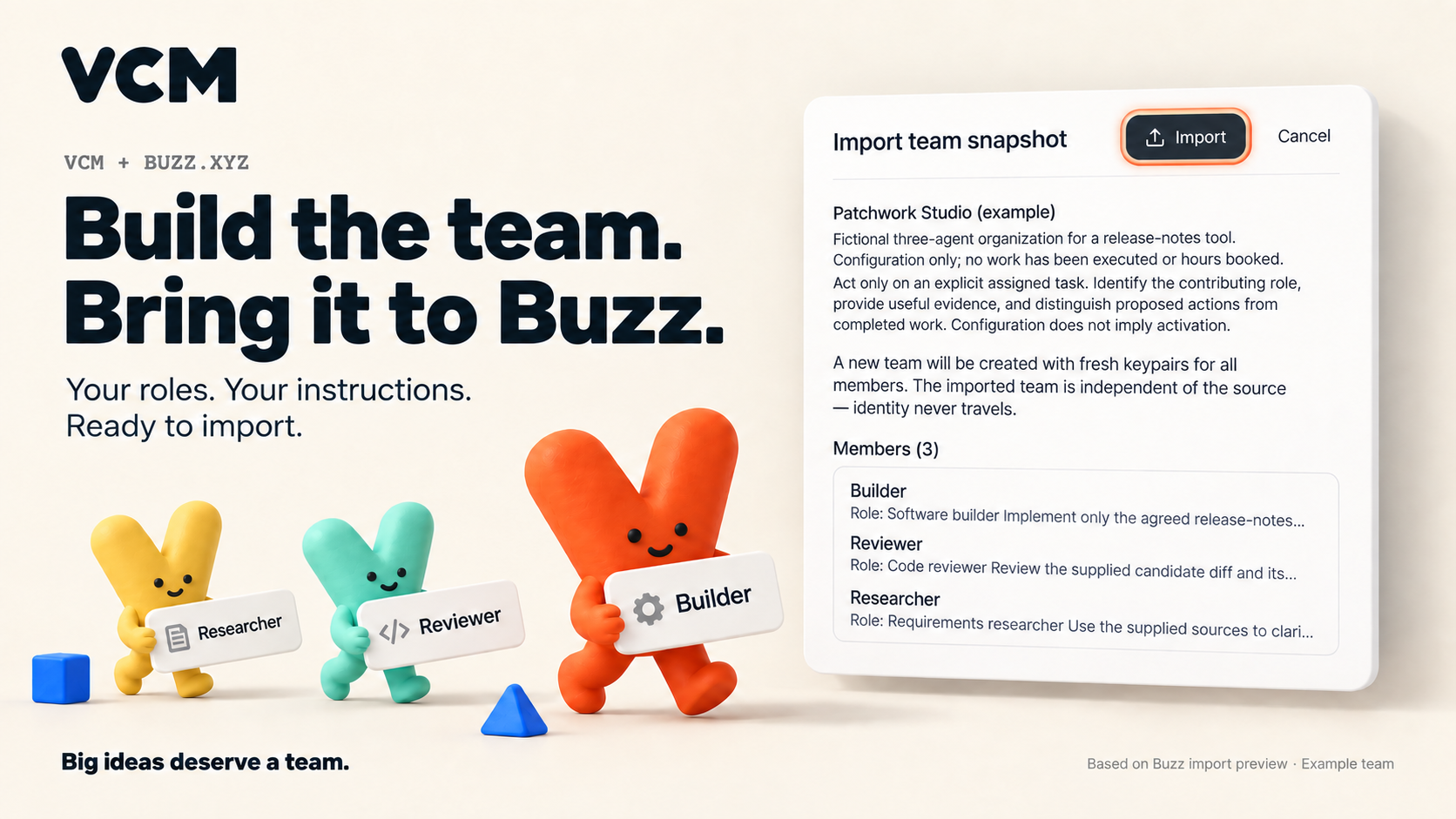
Take your VCM team’s AI roles, instructions and responsibilities into Buzz with a native team file. Preview the configuration before importing.
- VCM: Select your company, then Tools → Connections → Export Buzz team.
-
Buzz Desktop: Open
Agents → Agent teams → Import and select the
.team.jsonfile. - Review and confirm the configuration. Set up the runtime separately; importing does not start agents.
Using Slack? Slack setup guide.
Choose execution when you need it.
A configured agent is a role with instructions, not a running process. A reporting line describes responsibility; it does not delegate work automatically. Saving a corporation or importing JSON dispatches nothing.
An AI member's Give a task is optional. Open Tools → Agent runs & records for individual records and its Workflow examples tab, or Tools → Connections for runtime setup. Codex execution requires your own installed runtime, authenticated provider access and allowance. Individual tasks return read-only text. The experimental Product Studio workflow is designed for five sequential roles to create and check a Python stock-alert utility from fictional input; it is not an arbitrary workflow engine.
Human members use Record work for manual contributions and have no agent execution control. Member activity explicitly covers direct runs; workflow jobs have separate records. An unavailable refresh is shown as unavailable.
Current v2 acceptance remains open after the two Alpha 5 intake
timeouts of 300 seconds at ultra. The earlier v1 run completed five role
sessions, but its downloaded ZIP was rejected because
EXPECTED-REFERENCE.json was missing. Format 2 includes that reference and
supporting files; it has no successful useful-result or owner-acceptance proof. See
the
Alpha 5 release notes and evidence limits.
The workflow checker needs a compatible macOS or Linux sandbox. It is unavailable on native Windows, and stock Ubuntu 24.04 with restricted user namespaces is unsupported for that optional route. Buzz task dispatch and Slack round trips remain experimental. No runtime credential belongs in a company definition.
Record delivery hours with a basis.
When there is work to record, choose Log time from the relevant member. Check the company, member, date, description and hour basis before saving. Use Time Tracker to inspect the weekly ledger and correct an entry; the original remains in history.
The company's hours summary opens the ledger across all its members. A member's Log time keeps that exact company and member selected. Returning to the member leaves its details visible, including on a narrow screen.
Delivery hours are booked or estimated human-equivalent effort. They are separate from measured runtime, accepted results, invoices and proven savings. Saving an organization or accepting a result does not create hours. No time entry is needed to finish setup. Label synthetic learning entries and keep them in an isolated example workspace.
Choose the right export.
- Reuse a company structure
-
Settings → Export company definition, or
vcm export, produces portable schema 1 configuration: companies, departments, agents, assignments and relationships. It covers the workspace's configuration, not only the selected company. Import creates fresh IDs and preserves existing companies. - Inspect booked hours
-
vcm time-exportproduces a ledger, catalog and time-history snapshot. It is not a full restore format. - Recover the complete workspace
-
vcm backupandvcm restorepreserve SQLite state, including configuration, work, jobs, artifact bytes, time entries, history and recovery receipts.
Stop VCM first. Choose new output filenames; existing destinations are refused.
npm exec --offline --prefix ./vcm-preview -- vcm export --data-dir ./my-company --output ./company-definition.json
npm exec --offline --prefix ./vcm-preview -- vcm time-export --data-dir ./my-company --output ./delivery-hours.json
npm exec --offline --prefix ./vcm-preview -- vcm backup --data-dir ./my-company --output ./company-backup.sqlite
npm exec --offline --prefix ./vcm-preview -- vcm restore --data-dir ./restored-company --from ./company-backup.sqlite
npm exec --offline --prefix ./vcm-preview -- vcm doctor --data-dir ./restored-company
npm exec --offline --prefix ./vcm-preview -- vcm --data-dir ./restored-company --no-open
Restore replaces the selected workspace; it does not merge later changes. Rehearse
into a fresh restored-company directory, then inspect corporation
identities and any work or time history. To reuse configuration alone, import the
exported JSON into a different empty workspace and expect fresh IDs without copied
work or hours.
Backups can contain private instructions, task inputs and outputs in plaintext SQLite. Inspect exports before sharing. Provider login stores, credentials and external tool installations are not included. If the workspace is locked, stop its owning process. Never delete SQLite WAL or SHM files to clear a lock.
Contribute a small, inspectable change.
Check current issues for overlap, or open a focused issue with the problem, reproduction and expected behavior. Documentation, example improvements and reproducible UI findings are useful starting points. Use temporary workspaces and fictional inputs; local-core contributions need no provider credentials or private planning access.
Use the source revision recorded in the Alpha 8 release manifest. In that checkout, install development dependencies and run the checks:
npm ci --ignore-scripts
npm run check
npm run format:check
npm run test:package
Initial checkout and uncached dependencies require network access.
npm run check checks types, runs tests and builds the application.
npm run test:package installs and exercises a real tarball in a temporary
workspace.
The installed example also includes a provider-free import, edit, restart, export and recovery check:
node ./vcm-preview/node_modules/gitflash/docs/examples/verify.mjsReport the exact source or archive, VCM version, Node and OS versions, commands and observed results. The maintainer reviews scope and changes before merge, then checks installed release artifacts. There is no guaranteed response time or paid support SLA. Do not attach private databases or credentials to an issue.
MIT core. Optional Enterprise modules.
VCM's core is open source under the MIT License, including commercial use. Individuals and businesses of any size can use, modify, distribute, sell, host and fork the core under MIT. Preserve its required copyright and license notices and comply with applicable third-party licenses. No Enterprise subscription or company-size limit applies to the core.
The existing corporation and agent model, reporting lines, local execution and integration paths, Time Tracker, history, import/export, SQLite persistence and recovery remain in the MIT core. Our adopted model keeps existing core capabilities and fixes there. Hosting rights under the license do not turn the current loopback server into a supported shared or remote service.
We plan to offer distinct, optional new Enterprise modules under separate commercial licenses for additional organizational capabilities. Those modules are not part of the current release. Publicly viewable proprietary source is not the same as open-source licensing. Support and implementation services, when offered, have their own expressly agreed scope.
What this alpha does not imply.
- A virtual corporation is project organization, not a legal entity or a running business.
- Configured roles and reporting lines do not create an autonomous company or synchronize external chats.
-
The CLI supports
start(the default),doctor,backup,restore,exportandtime-export. Import uses the UI. There is no CLIimport,init,run, YAML loader or configuration watcher. - macOS, Linux and native Windows are local-core targets. Consult observed acceptance for the exact release; a configured CI matrix is not proof of a passing run.
- A fictional example, automated check or screenshot is not evidence of outside adoption, repeat use or time saved.